KERI Series: Understanding Self-Addressing Identifiers (SAID)

What is a self addressing identifier, a SAID? What does this mean and how is a SAID created and verified? This post answers these questions. We show a generalized process for calculating SAIDs and delve into the encoding format for CESR-compliant self addressing identifiers. Examples with three popular algorithms, SHA2-256, SHA3-256, and Blake3-256, show specifics of applying the general process. This general process can be used for calculating SAIDs with other cryptographic algorithms.
For those who want to skim there are pictures below including bit diagrams that illustrate exactly what is happening.
What is a SAID?
Fundamentally, a SAID is a cryptographic digest of a given set of data and is embedded within the data it is a digest of. A CESR-style SAID pads the digest to 33 bytes and adds a type code into the padded digest to replace resulting Base64 pad characters. It looks like this:
HPJbVi6fZvGNCASDiwABn2wpQ0lI-2cR0yaoRErkD-j6
This is a SHA3-256 digest encoded in the CESR format.
What is the CESR format? It is the Base64 URL Safe encoding of the raw digest along with some front-padding of zero bits and a type code, as shown in detail below. From the above SAID, the 'H' character is the type code. The rest of the string is composed of Base64 URL Safe characters.
Why Base64? More Space
Why was Base64 encoding used rather than something like hex encoding? Because Base64 encoding allows maximally compact text encoding of data using a well-known encoding protocol of alphanumeric characters (0-9, a-z, A-Z, -_). As compared to hexadecimal ("hex") encoding Base64 encodes 6 bits of data per Base64 character whereas hex encoding encodes 4 bits of data per Base64 character, so Base64 can store 50% more data in the same space compared to hex. This helps reduce bandwidth and power costs, optimizing performance overall.
Note on Hash or Digest Terminology
A note on terminology, sometimes digests are called hashes or hash values. The technical definition of the term hash refers to a hash function. Hash functions transform data into a fixed-size string. This fixed-size string is the digest, the output of a hash function.
Back to SAIDs, the fact that a SAID can be embedded in the data it is a digest of is why it is called "self addressing." The digest is essentially a unique identifier of the data it is embedded in.
A SAID (Self-Addressing Identifier) is a special type of content-addressable identifier based on an encoded cryptographic digest that is self-referential.
Composable Event Streaming Representation ToIP Specification – Section 12.6 – Dr. Samuel M. Smith
What is a content addressable identifier? A content addressable identifier is an identifier derived from the content being stored which makes a useful lookup key in content addressable storage, such as IPFS or a key-value store database like LevelDB, LMDB, Redis, DynamoDB, Couchbase, Memcached, or Cassandra.
Embedding a digest changes the source data and hash, right?
How can the SAID digest be accurate given that placing the SAID in the data it identifies changes the data, thus producing a different hash? The way SAIDs accomplish this is with a two step generation and embedding process.
Two step SAID generation and embedding process
- During SAID calculation the destination field of the SAID is filled with pound sign filler characters ("#") up to the same length of the SAID.
- The digest is then calculated, encoded, and placed in the destination field.
The reverse occurs for verification of a SAID.
- The SAID is replaced with filler '#' characters up to the same length of the SAID.
- The digest is calculated, encoded and compared with the SAID
Code examples with multiple algorithms
Let's start with some code examples showing how to create a correct SAID including the appropriate pre-padding characters. For additional understanding come back and review these examples after you have read the sections on 24 bit boundaries, pad characters, and pad bytes.
For now, say you want to use other cryptographic digest algorithms to create your SAIDs. How would you go about doing that?
It is as easy as changing your hashing function and then using the corresponding type code from the CESR Master Code Table corresponding to your desired digest algorithm.
The following code examples in Python illustrate the process for each of the following algorithms, Blake2b-256, Blake3-256, and SHA2-256. The SHA3-256 algorithm is shown above in the example in the main body of the article.
Creating a Blake2b-256 SAID – Step By Step
For a Blake2b-256 SAID with Python you just change the hash function and specify a digest size.
= b
= # <-- See the different algorithm blake2b
= b +
=
= # convert bytes to string of chars for easy replacement of 'A'
= # replace first 'A' character with 'F' type code
= # convert string of chars to string with .join()
assert ==
assert == 44 # length should still be 44 characters, 264 base64 bits, a multiple of 24 bits
Creating a Blake3-256 SAID – Step By Step
Blake3-256 is even easier, though it requires the blake3 library
= b
= # <-- See the different algorithm blake3.blake3
= b +
=
= # convert bytes to string of chars for easy replacement of 'A'
= # replace first 'A' character with 'E' type code
= # convert string of chars to string with .join()
assert ==
assert == 44 # length should still be 44 characters, 264 base64 bits, a multiple of 24 bits
Creating a SHA2-256 SAID – Step By Step
And finally SHA2-256 is also easy, just changing the hash function used:
= b
= # <-- See the different algorithm sha256
= b +
=
= # convert bytes to string of chars for easy replacement of 'A'
= # replace first 'A' character with 'I' type code
= # convert string of chars to string with .join()
assert ==
assert == 44 # length should still be 44 characters, 264 base64 bits, a multiple of 24 bits
Five parts of a SAID
As mentioned earlier, a SAID is a cryptographic digest. Specifically, it is a kind of digest usable as a content addressable identifier, and it is embedded in the content it identifies. SAIDs were invented by Dr. Samuel Smith as a part of his work on key event receipt infrastructure (KERI), authentic chained data containers (ACDC), and composable event streaming representation (CESR).
To understand how SAIDs work you must learn the interplay of five different concepts including:
- Bit boundaries – aligning on 24 bit boundaries using pre-padded bytes on the left/front of raw bytes
- Hash values – hashing input bytes with hashing functions to produce output hash values (digests)
- Encoding with the URL-safe variant of Base64 encoding,
- Using type codes to indicate type of hashing function and size of digest,
- The two-pass SAID calculation and embedding process.
7 Steps to Calculate and Embed a SAID
Briefly, the process is listed here. A detailed explanation and example follows this set of steps.
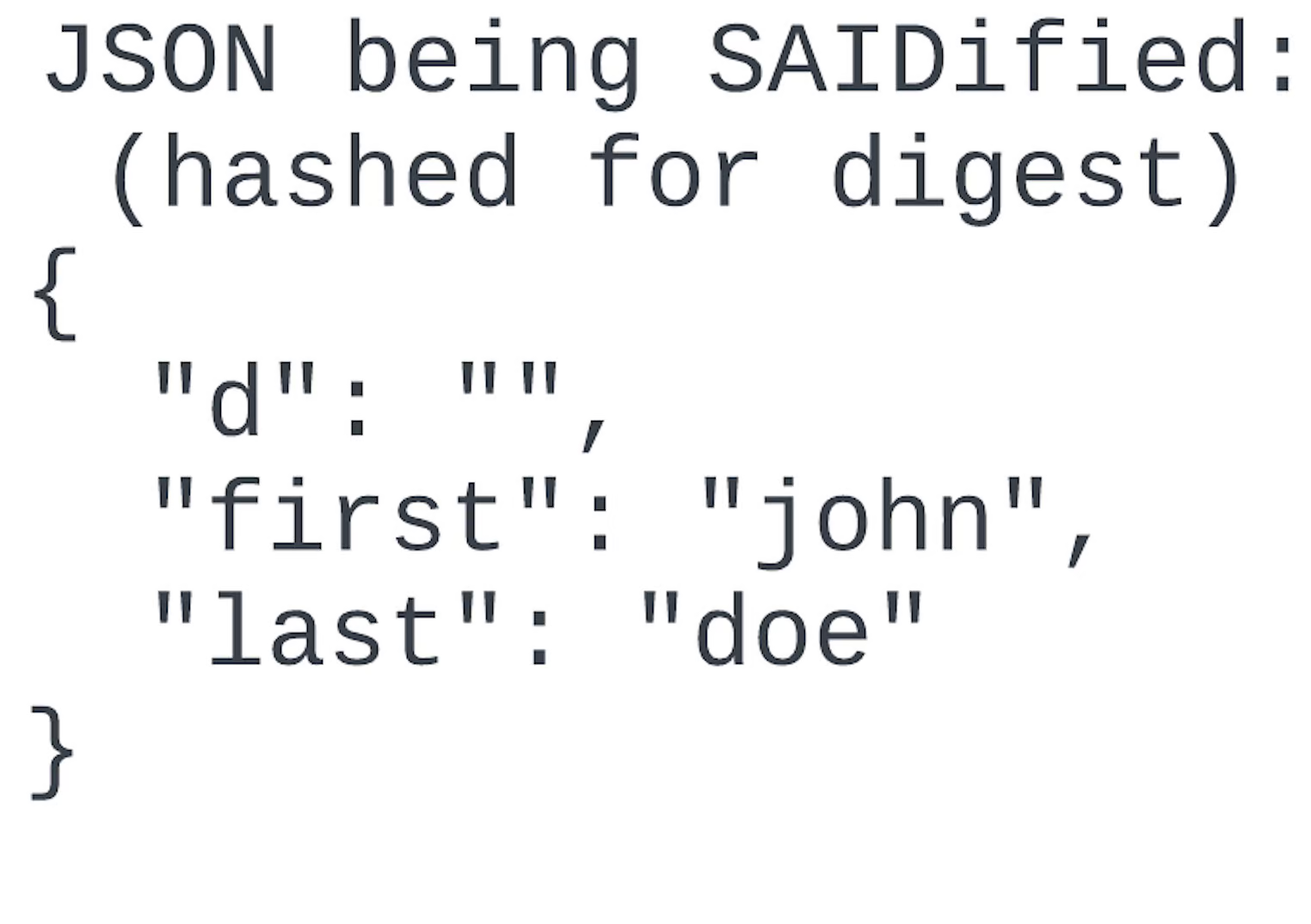
Get an object to calculate a SAID for with a digest field that will hold the SAID. In this case we use the JSON object below and the "d" field will hold the SAID.
- The field does not have to be empty though it can be. Prior to digest calculation it will be cleared and filled with the correct number of filler characters.
Calculate the quantity of Base64 characters the final encoded bytes will take up and fill the digest field with that many '#' characters. This value may be looked up from a parse table like the CESR Master Code Table based on the type of hashing function used.
- Replace the contents of the digest field, "d" in our case, with pound sign ("#") characters up to the number of filler characters calculated in step 2.
- The calculated size and pad values used for this step are reused in step 4.
Calculate a digest of the object with the filler '#' characters added using the hash function selected.
- This will result in a quantity of digest bytes, specifically 32 bytes for the SHA3-256 algorithm.
Calculate the quantity of pad bytes that when added to the digest bytes will give you a value length that is multiple of 24 bits. This math is shown below. For us this is 1 pad character giving us 33 bytes. This value may be looked up from a parse table like the CESR Master Code Table.
- Perform pre-padding by prepending the pad byte to the digest bytes to get padded raw bytes.
Encode the padded raw bytes with the Base64 URL Safe alphabet.
- Pre-padding causes some characters at the start of the digest to be encoded as "A" characters which represent zero in the Base64 URL Safe alphabet.
Substitute the type code for the correct number of "A" zero character(s) in the Base64 encoded string according to the CESR encoding rules from the CESR Master Code Table. Use the type code corresponding to the cryptographic hash algorithm used. In our case this is "H" because we are using the SHA3-256 algorithm.
- This is your SAID!
Place the Base64 encoded, type code substituted string (your SAID!) into the digest field in your object. This makes your object self-addressing.
3 Steps to Verify a SAID
- Start with a SAID from an object you already have.
- Calculate the SAID for the object using the process shown above
- Compare the SAID you pulled out of the object with the SAID you calculated.
- If they match then the SAID verifies. Otherwise the SAID does not verify.
Example walkthrough with JSON and SHA3-256
Create Step 1: Get an object with some data and a digest field
Starting with the JSON below we have a "d" field, or digest field, in which the SAID will eventually be placed. In our case it is empty though it could start with the SAID in the "d" field and the process would still work.
Create Step 2: Calculate the quantity of filler '#' characters
The expected final size of the SAID must be known in advance in order to create a JSON object with a stable size. Since the SHA3-256 digest we start with is 32 bytes, or 256 bits (not a multiple of 24), then all we need to add is one byte to get to 264 bits, which is a multiple of 24, or 33 bytes.
264 (bits) / 6 (bits per Base64 char) = 44 (Base64 chars)
This means the total length of the resulting SAID will be 44 Base64 characters. So, you need 44 filler '#' pound sign characters in your digest field of your JSON object prior to calculating the SAID.
Create Step 3: Calculate a digest of the data
When calculating a digest then you take the data with the correct number of filler characters added to the digest field and you simply take a digest of it.
= b
=
Create Step 4: Calculate the quantity of pad bytes
For a SHA3-256 digest of 32 bytes, or 256 bits (not a multiple of 24), we need to add one byte to get to 264 bits, which is a multiple of 24, or 33 bytes.
Create Step 5: Base64 URL Safe Encode the padded raw bytes
= b
=
= b +
=
assert == b
assert == 44
Create Step 6: Substitute Type Code for the front 'A' character(s)
For a SHA3-256 digest that type code is 'H' from the CESR Master Code Table.
= b
=
= b +
=
=
= # replace first 'A' character with 'H' type code
=
assert ==
assert == 44
Create Step 7: Place the SAID into the digest field
This takes us back to where we started off, with a valid SAID and a SAIDified JSON object.
Implementations
Web Of Trust KERIpy Python
=
= b
=
, =
assert ==
Human Colossus Foundation Rust SAID
The Human Colossus Foundation has a Rust implementation with WASM bindings for their JavaScript package. See their SAID generator and verifier demo.
SAIDify TypeScript
If you want to use a Typescript library you can use the SAIDify library.
// create data to become self-addressing
said
// ELLbizIr2FJLHexNkiLZpsTWfhwUmZUicuhmoZ9049Hz
// verify self addressing identifier
// true
Conclusion
The key takeaways from calculating SAIDs are:
- Use pre-padded bytes to align on a 24 bit boundary prior to encoding as Base64 characters.
- Substitute type codes in for the leading 'A' character(s) of a SAID.
- It is easy to choose different algorithms for the SAID calculation process. Just make sure you use a code on the CESR Master Code Table if you want to be CESR compliant.
- There are multiple implementations of the SAID algorithm you can use.
Now go make some SAIDs!
References
- HCF oca-spec #58
- RFC 4648: The Base16, Base32, and Base64 Data Encodings, specifically section 5
- Composable Event Streaming Representation (CESR) ToIP Specification, specifically section 12.6
- Self Addressing Identifier IETF draft specification
- SADs, SAIDs, and ACDCs video presentation by Daniel Hardman